
When in 1991 the internet became available for public, we didn’t know that it will become the holy grail of our lives. It has and will continue to have a huge impact on our day-to-day activities.
As the internet became popular and a household name so did its commercialization. Today everything is available on the internet : from music to food, to even your life partner – you will find it all.
So what happens when you open such a mammoth network for the public, give control to them and let them use it however they seem fit. The answer to this is a huge list but below are few important points to note:
These are the two main points that gave rise to internet censorship. So what does government do. A simple answer would be that they can temporarily block all social media or websites as we saw this happen in few countries recently.
Giants like Netflix or Hulu, also geo-restrict their contents.
Apart from this, your ISP also controls your internet experience. They throttle your internet speed depending on the amount you are paying them and collect your online footprint.
The rise of proxies:
When there are restrictions, smart people will always find a way to bypass them. This lead to the development and rise of VPN and proxies.
Here’s how to understand what a Proxy or VPN does. Suppose your ISP has blocked a website, now to access this blocked website you will first send a request to a server outside your country and that server will fetch the website on your behalf. As the server belongs to a country where the website is not blocked, you will be able to view the website
Check also this : Web scraping for business.
This server acts as a middleman and you do not have to directly request access for the website, hence it is called a proxy server.
Using Google as a proxy server:
As I mentioned earlier, smart people will always find a way to bypass restrictions and the best way I recently stumbled upon was using Google as a proxy server.
Don’t rub your eyes, you read it right, “Googleâ€. Actually, there are two simple ways which I will explain in detail.
Method 1: Using GoogleWeblight
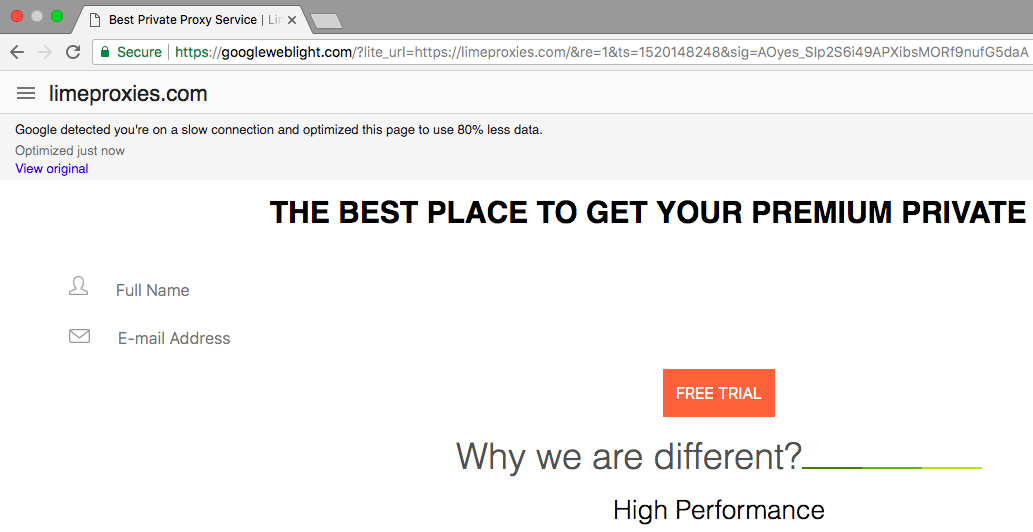
GoogleWeblight is a wonderful initiative by Google to speed up website loading time when using Google Chrome. It removes ads and other unnecessary components and thus speeds up the browsing and saves data as well. To achieve this, Google routes the traffic through their servers.
When using Google as a proxy, as few website components are not loaded, the website may appear a bit different but it’s better than no website at all.
So Google acts as a middleman or proxy server. To load a website using Weblight, use the below URL
http://googleweblight.com/?liteurl=http://WEBSITEURL (Change the WEBSITE URL to your own URL)â€
A point worth noting is that Google won’t be able to show all the websites that you access through Weblight as not all pages can be transcoded
Method 2: Using Google Translator
Google can translate web pages from one language to another. When you use Google translator, using its servers it will convert the contents of the page to your requested language, this enables us to use it as a proxy server. Follow below mentioned simple steps to achieve this.
Step 1: Open https://translate.google.com/
Step 2: Enter the website address that you wish to access in the first box, example https://limeproxies.com/
Step 3: Now in the second box choose any language other than the one the web page originally is in and click on the link
Step 4: Once the web page loads, click on “Original†to view the original web page
These were the simple tricks that can make Google works as a proxy server for you. Although it may not be as powerful as using a paid proxy server it’s worth a try and can be useful in case you need to check a website when you do not have a proxy handy.
Post Quick Links
Jump straight to the section of the post you want to read:



About the author
Expert
Lorem ipsum dolor sit amet, consectetur adipiscing elit, sed do eiusmod tempor incididunt ut labore et dolore magna aliqua. Ut enim ad minim veniam, quis nostrud exercitation ullamco laboris nisi ut aliquip ex ea commodo consequat.
View all postsRelated Articles
Datacenter vs Residential Proxies: Which Should You Choose in 2026?
Datacenter proxies are faster and cheaper for most tasks. Residential proxies handle heavily bot-protected sites. This guide breaks down every difference so you pick the right type — and avoid overpaying.
How to Use Proxies for E-Commerce Price Monitoring in 2026
Proxies are the backbone of reliable e-commerce price monitoring. Discover how to track competitor prices at scale, beat anti-bot systems, monitor geo-specific pricing, and build a full price intelligence stack in 2026.
Web Scraping With Proxies: The Complete Guide for 2026
Web scraping with proxies lets developers and businesses collect data at scale without IP bans or rate limits. This complete 2026 guide covers Python setup, proxy rotation, tool comparisons, anti-bot tactics, and ethical best practices.